You’ve set up your lighting, prepared your talking points, and hit the "Go Live" button with high expectations. Ten minutes later, the viewer count is stuck at three—and two of them are your family members. This is the "Ghost Stream" phenomenon, a frustrating reality for thousands of creators on TikTok. In an era where live commerce and real-time engagement drive billions in revenue, standing out in the "Live" feed requires more than just showing up; it requires a strategic understanding of the TikTok Live algorithm.
The competition is fierce, but the rewards are massive. TikTok's live-streaming ecosystem has evolved into a powerhouse for brand discovery and community building. Whether you are a small business owner trying to sell products or a gaming creator looking for a loyal fanbase, increasing your viewership is the first step toward monetization and influence.
To increase TikTok livestream viewers, you must trigger the algorithm by posting a "teaser" video 30 minutes before going live, using interactive features like polls and Q&As to boost retention, and maintaining a consistent schedule during peak hours (6 PM – 10 PM). High engagement in the first five minutes is the key to being pushed to the global "For You" Live feed.
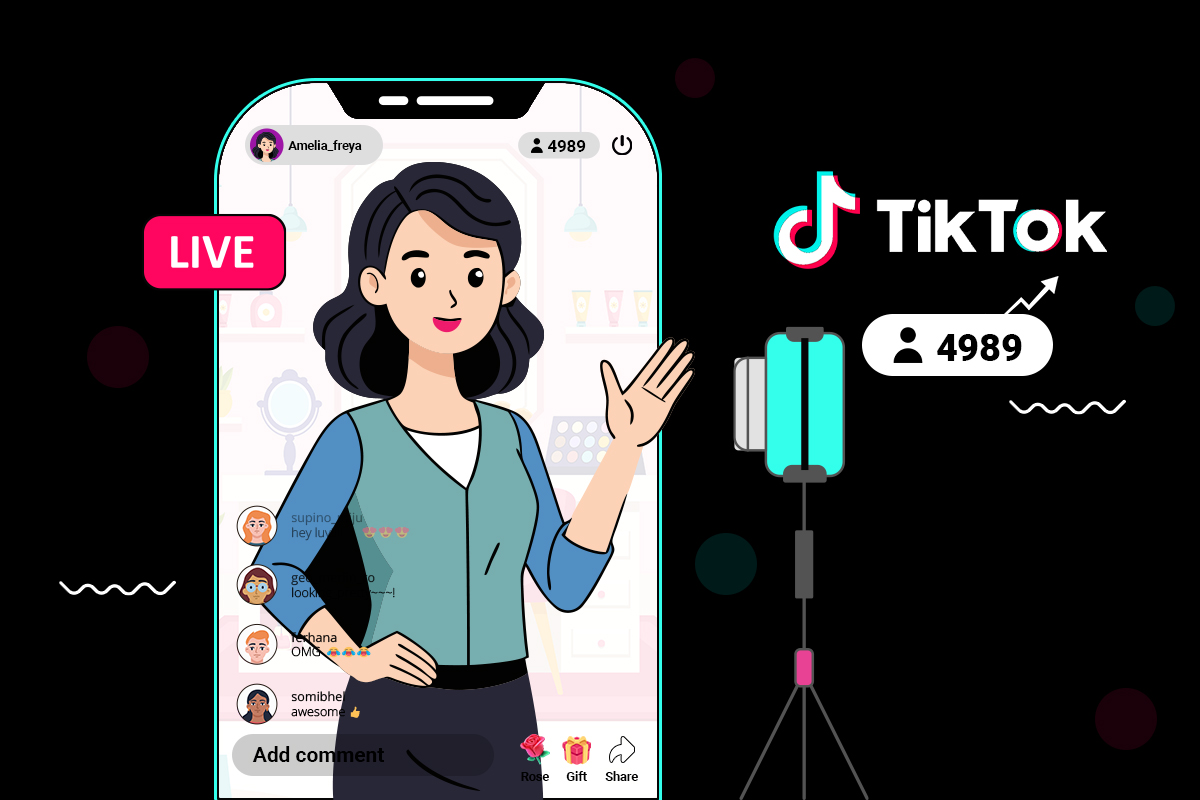
Never go live "cold." About 20 to 30 minutes before you plan to start your stream, post a high-quality short-form video. When that video appears on users' For You Pages (FYP), your profile picture will have a pulsing "Live" ring around it. This acts as a gateway, funneling viewers from the FYP directly into your broadcast.
The algorithm decides your stream's fate in the first five minutes. Start with a high-energy hook. Tell the audience exactly what they will gain by staying.
Example: "In ten minutes, I'm doing a $50 giveaway," or "I'm going to show you the secret hack I used to grow this account."
Your title should be click-worthy but not clickbait. Use keywords related to your niche. If you are a gamer, mention the specific level or challenge. If you are a business, mention a "Flash Sale." Your cover image should be a clear, high-contrast photo of your face or your product—avoid cluttered backgrounds.
If you are using TikTok Live to sell products, your strategy must shift from "entertainment" to "value-driven commerce."
At ASOLeapedia, we recommend integrating your Live strategy with your overall brand presence. Ensure your bio contains a clear CTA and that your profile is optimized for the "Search" function so people can find your shop even when you aren't live.
Timing is everything. If you go live when your audience is asleep, your "Interaction Density" will be zero. While global trends exist, your specific "best time" is found in your TikTok Analytics Creator Tools.
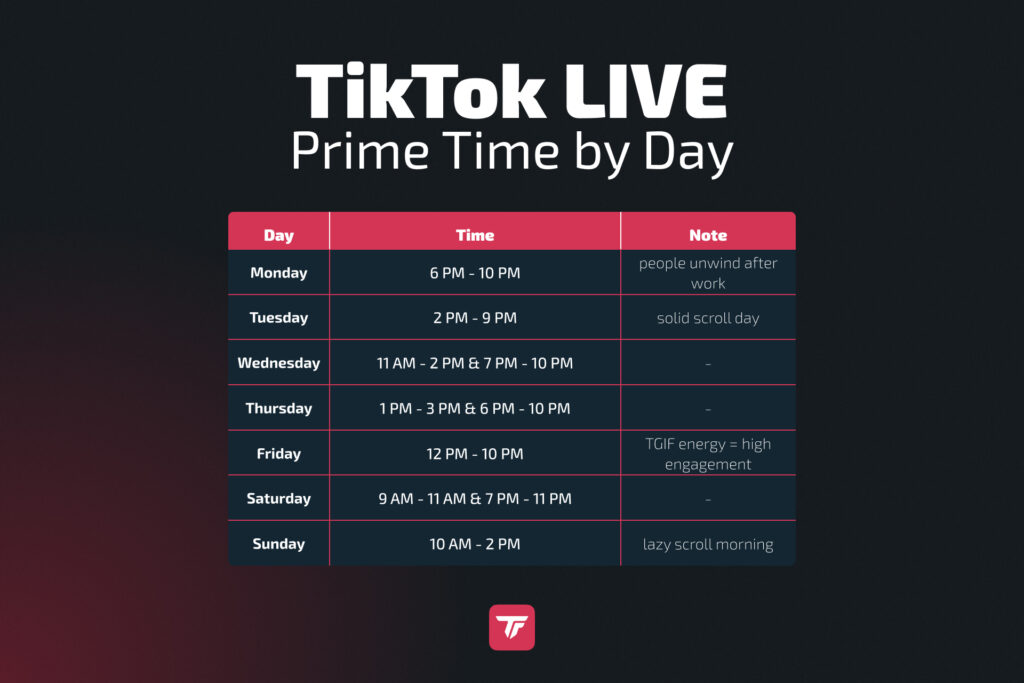
To find your personal peak time, go to Settings > Creator Tools > Analytics > Followers. Scroll down to "Follower Activity." Aim to go live one hour before your followers' peak activity to catch the rising wave.
If you are seeing a decline in viewers, it is usually due to one of these three factors:
While both platforms offer live features, they serve very different purposes for audience growth. Understanding this distinction is vital for your 2026 social media strategy.
| Feature | TikTok Live | Instagram Live |
|---|---|---|
| Discovery | High (Shown to non-followers via FYP) | Low (Mostly shown to existing followers) |
| Monetization | Robust (Gifts, Diamonds, Shop) | Limited (Badges) |
| Interaction Tools | Polls, Q&A, Matches, Treasure Boxes | Basic Polls and Guesting |
| Best For | Viral growth and new customer acquisition | Nurturing loyal fans and deep-dive community building |
For creators looking to increase viewers from scratch, TikTok is the clear winner because of its discovery-based algorithm. Instagram Live is better once you already have a massive following you want to sell to directly.
Engagement isn't just about talking; it's about making the viewer part of the show. TikTok provides several built-in tools to facilitate this:
Ask simple questions: "Should I wear the red or blue shirt?" "Which game should I play next?" This forces the viewer to interact, which signals "High Engagement" to the algorithm.
You can drop a Treasure Box in your stream containing "Coins." Viewers have to stay for a specific countdown (usually 1-5 minutes) to collect them. This is the single most effective tool for increasing average watch time.
Collaborating is the fastest way to "borrow" someone else's audience. In a Live Match (PK), two creators compete to see who can get the most gifts in 5 minutes. The competitive nature encourages viewers to participate and stay until the end.
TikTok Live is a real-time broadcasting feature that allows creators to interact directly with their followers and new audiences. Unlike static videos, Live streams are unedited, raw, and highly interactive. In 2026, the feature has transitioned from a simple "chat" tool to a sophisticated broadcasting platform that includes "Live Shopping," "Multi-guest" panels, and "Live Matches."
According to research from TikTok’s Business Newsroom, users are 1.6x more likely to say TikTok Live helps them get to know a brand compared to other platforms. This is where ASOLeapedia comes in—by optimizing your profile’s "App Store Optimization" (ASO) and social presence, you ensure that when people find your live stream, they are greeted by a professional, high-converting profile that encourages them to hit "Follow."
The TikTok Live algorithm does not distribute viewers randomly. It operates on a "vibe and velocity" model. If your stream has high "velocity" (lots of likes, comments, and shares in a short period), the algorithm boosts your "vibe" score and pushes you to the top of the Live feed.
"The biggest mistake creators make is waiting for viewers to arrive before they start being entertaining. You have to perform for the one person watching as if there are ten thousand. The algorithm tracks the energy of the room from second one."
— Marcus Thorne, Senior Social Strategist at ASOLeap.
The tool you use depends on your content type. TikTok Live Studio is a desktop application designed for gamers and professional broadcasters, whereas the mobile app is for "on-the-go" lifestyle content.
For gaming creators, TikTok Live Studio is essential for retention. Viewers expect high-frame-rate gameplay. For small business owners, the mobile app is usually superior as it allows you to walk around your workspace and show products up close.
A chaotic chat is a quick way to lose viewers. As your stream grows, you must have moderators. Moderators can:
"A good moderator is like a DJ for your chat. They keep the rhythm going so the creator can focus on the performance."
— Elena G., Professional TikTok Moderator.
Generally, you need at least 1,000 followers to access the Live feature. However, some regions and TikTok Shop seller accounts may have different requirements or access to "Live Studio" earlier.
No. Buying bot viewers will actually hurt your account. The algorithm tracks "Interaction Density." If you have 1,000 viewers but 0 comments or likes, TikTok will flag the stream as "low quality" and stop showing it to real people.
The sweet spot for the algorithm is 30 to 90 minutes. Anything shorter than 20 minutes doesn't give the algorithm enough time to find your audience. Anything longer than 2 hours often sees a significant drop in engagement unless it's a special event.
Yes, by using TikTok Live Studio or an RTMP key (if available to you). This is ideal for gaming and high-production broadcasts.
This is usually due to a "Community Guidelines" violation. Check your "Account Status" in settings. It could also be that you are using copyrighted music, which can lead to your stream being muted or suppressed.
Increasing your TikTok livestream viewers is a marathon, not a sprint. By combining high-energy performance with data-driven timing and the right interactive tools, you can turn a quiet room into a viral sensation. But remember, a great live stream is only half the battle. You need a professional, optimized profile to keep those viewers coming back.
Want to master the art of digital growth? Visit ASOLeapedia today for expert insights on App Store Optimization, social media scaling, and the latest trends in the creator economy. Let’s take your brand to the next level.
Stop letting the algorithm win.
Place your order today or get started with a 100% free trial. Focus on creating awesome content and we’ll do the rest.
Start now


